

Glo 1gb (Now 500mb) Free Data is now available for all GLO Users to enjoy. This cheat is blazing in as much as you have Glo WTF Plan active plan.
Since MTN Users have been enjoying MTN Unlimited Non Stop, it’s Time for Glo users to enjoy if not unlimited but limited 1gb once apart from the Glo Unlimited Slow DNS.
To activate this GLO 1gb (Now 500mb) Cheat, follow all instruction below carefully….
Requirements
- Android Device
- GLO 0.0kb Sim with active WTF PLAN
- Ha Tunnel Latest VPN || Download Here
- Ha Tunnel GLO 500mb File || Download Here
How To Subscribe To Glo WTF Plan
Since you need active WTF Bundle, below is the procedure on how to subscribe…
- Dial *777# on your Glo Line.
- Reply with 2 (Data)
- After that, reply with 1 (Buy Data Plan)
- Select One Off by replying with 2
- Then Reply with 6 (Social Bundle)
- Select WTF social bundle by replying with 1 (WTF Bundles)
- Lastly, choose the plan that suits your need. Below are the plan details..
Next is to tunnel the WTF Plan with Ha Tunnel Configuration File and browse daily…
How To Tunnel GLO 500mb With Ha Tunnel Plus VPN
- Install the VPN after Downloading.
- Now, download GLO 500mb File below.
[su_button url=”https://mega.nz/file/OzBHiYAC#hhEoXjo331JWTYMuuE07145RexAwFWykkEXu2if2itk” style=”stroked” background=”#078b2d” size=”7″ center=”yes” radius=”6″ icon=”icon: file”]GLO 500mb File[/su_button]

NOTE: The file you are about to download will expire on 30-11-22. Bookmark this page and visit before expiry date to get more file.
- Open Ha Tunnel Plus and tap on the Three Dot at the top right corner of the apk.

- Tap on Import/Export.

- Then tap on Import Config and import the GLO 1gb File.
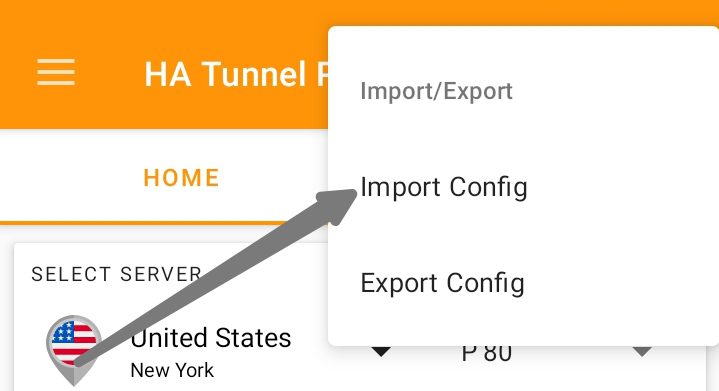
- Once you successfully Import the configuration file, Tap on Start
- The VPN will connect within seconds if you followed the above procedures carefully.
- You can then minimize the VPN and enjoy.
[sharethis-inline-buttons]NOTE: Kindly note that this cheat will only work if you have WTF Plan activated and the configuration file connected. You can only get 1gb once on your sim
Want to stay updated? Tap the below buttons to join our members now.


Do you have any issues with this post? Use the comment box below to report any issues related to this post, including broken links, and you will be replied as soon as possible. You can also contact us on telegram.



This thing is not working at’ll
Follow the procedures carefully.
It’s not showing in the VPN
Kindly open your file manager, go to your download folder and remove .txt from the file.
The file as expired
Ok, we will update it in a bit
Unable to download the file and the APN is saying APN cannot be empty
I downloaded the latest updated file, but it still not connecting. What do I need to do?
General issue
Will the wtf data be deducted?
No, it shouldn’t be deducted
I have done everything but I can’t even get it to connect. It keeps reconnecting and disconnects after 10 tries. What should I do?
Glo currently Undergoing maintenance